Blender 5.3 Adds Native Gaussian Splatting, Vulkan and AI-Powered Viewport Denoising
Blender 5.3 introduces native 3D Gaussian Splatting, Vulkan by default, NVIDIA DLSS denoising and new tools for photorealistic spatial content.
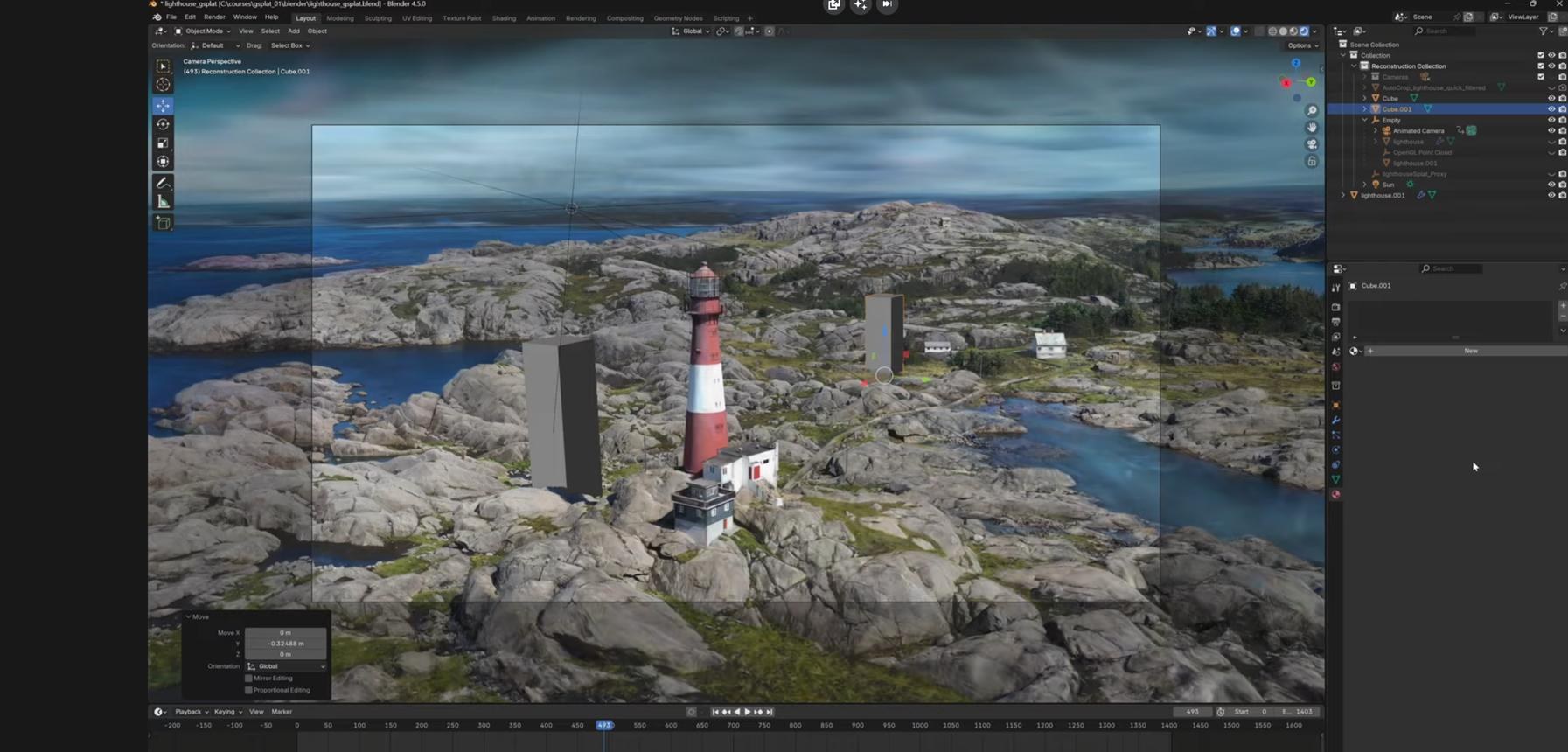
Blender viewport with a Gaussian splat scene, shown for illustration; captured in an earlier Blender version, not an official Blender 5.3 image.
Key takeaways
- The Blender Foundation released Blender 5.3 on November 10, 2026 as a stable, free download.
- Gaussian Splats in PLY and SPZ files can now be imported natively as point clouds and processed with Geometry Nodes.
- Splats render in Workbench, EEVEE and Cycles and can be relit, though inherited capture lighting still limits results.
- Vulkan becomes the default graphics backend on supported Windows and Linux systems.
- NVIDIA DLSS adds AI-powered viewport denoising on compatible RTX hardware.
On this page
Blender 5.3 brings Gaussian Splatting into the core software
Creating photorealistic digital representations of physical environments has become increasingly important for spatial computing. Applications involving virtual reality, augmented reality, digital twins and immersive production often require realistic three-dimensional content.
On November 10, 2026, the Blender Foundation officially released Blender 5.3, introducing native support for 3D Gaussian Splatting. The release also includes improvements to rendering, GPU acceleration, procedural geometry and production workflows.
One of the most significant changes is that Gaussian Splats can now be imported and processed directly within Blender without relying exclusively on external add-ons. The software supports importing PLY and SPZ files as point clouds.
Users can then manipulate the data through Geometry Nodes and render it using Workbench, EEVEE or Cycles. This introduces new possibilities for working with photorealistic captured environments inside an established 3D creation platform.
What is 3D Gaussian Splatting?
3D Gaussian Splatting is a technique for representing scenes using large collections of spatial elements called Gaussians. Each Gaussian can contain information about position, scale, orientation, color and opacity.
Together, these elements approximate the appearance of a three-dimensional environment. The technique differs from conventional polygonal modeling.
Traditional 3D assets use vertices, edges, faces and textures to define objects. Gaussian Splatting represents visual information through spatially distributed primitives that contribute to the final rendered image.
The method has attracted attention because it can reconstruct highly detailed scenes from photographs or video. It can preserve complex visual characteristics such as vegetation, irregular surfaces and fine environmental details.
These characteristics make it relevant for applications where photorealistic appearance is important. However, a Gaussian Splat is not equivalent to a conventional polygonal mesh.
It does not automatically provide clean geometry, collision surfaces, semantic object information or editable materials. Those differences matter when transferring captured content into interactive applications.
Native import of PLY and SPZ files
Blender 5.3 supports two file formats for Gaussian Splatting workflows. PLY is a format commonly used for storing point-cloud and geometric data.
SPZ is a compressed format designed for representing Gaussian Splat data more efficiently. The new import functionality allows users to bring compatible captured scenes into Blender.
Once imported, the splats can be represented as point clouds. This allows them to participate in workflows involving procedural geometry and scene composition.
Previously, many Blender workflows required external add-ons or specialized tools to display Gaussian Splat content. Native support reduces that dependency.
However, the initial implementation has limitations. Importing and rendering Gaussian Splats does not mean Blender can export every modified splat scene back into a fully compatible external format.
Users should verify export requirements before building a production pipeline around the new feature.
Geometry Nodes expands how captured scenes can be processed
Geometry Nodes is Blender's procedural geometry system. It allows users to construct operations through connected nodes rather than manually editing every element.
With Gaussian Splats represented as point clouds, developers and artists can use Geometry Nodes to process imported data. This can support procedural manipulation and organization of captured content.
For example, a scene could contain Gaussian Splat information alongside conventional polygonal objects. Artists can combine different content representations within a single Blender project.
This is useful because spatial environments rarely depend on only one type of asset. A captured background may provide photorealistic context.
Conventional meshes may provide interactive objects. Procedural geometry may generate additional scene elements.
Blender 5.3 allows these approaches to coexist more directly within the application. Nevertheless, converting Gaussian Splats into clean, optimized game-ready geometry remains a separate technical challenge.
Rendering Gaussian Splats in EEVEE and Cycles
Blender 5.3 allows Gaussian Splats to be rendered using its existing rendering engines. Workbench provides a fast viewport-oriented rendering mode.
EEVEE supports real-time rendering workflows. Cycles provides physically based path tracing.
The ability to use Gaussian Splats across these engines makes captured content accessible within established Blender production workflows. The release also introduces the ability to relight Gaussian Splat content.
This is important when integrating captured scenes with newly created 3D elements. Lighting differences can make a scene appear visually inconsistent.
However, relighting Gaussian Splats is not identical to relighting conventional meshes with physically defined materials. The reconstructed appearance may contain lighting information inherited from the original capture.
The quality of relighting depends on how that information is represented and processed. Blender's implementation provides new capabilities but does not eliminate the limitations of image-based reconstruction.
Vulkan becomes the default graphics backend
Another important change is the adoption of Vulkan as Blender's default graphics backend on supported Windows and Linux systems. Vulkan is a modern graphics API designed to provide lower-level access to GPU resources.
It supports explicit control over rendering and memory operations. Blender has been developing Vulkan support as part of its graphics architecture.
With version 5.3, Vulkan becomes the default on supported Windows systems, excluding Windows ARM, and on Linux. This represents a substantial change to the application's rendering infrastructure.
The release also introduces hardware ray-traced shadows in Workbench on supported Metal and Vulkan configurations. These changes can improve graphics workflows, but their impact depends on the GPU, drivers and operating system.
A default graphics backend does not guarantee identical performance on every machine. Users working with older hardware or specialized configurations should verify compatibility.
NVIDIA DLSS improves viewport denoising
Blender 5.3 introduces an NVIDIA DLSS-based denoising option for supported GPUs. Denoising is important in path-traced rendering.
Rendering a scene with a limited number of samples can produce visible noise. Traditional workflows reduce that noise through additional sampling or post-processing.
DLSS uses AI-based reconstruction techniques to improve image quality from available rendering information. Blender's new viewport denoiser can reuse information from previous frames and upscale lower-resolution images.
This can provide a cleaner interactive preview while reducing the amount of rendering work required. The feature is particularly relevant for complex scenes where artists need to inspect lighting, materials and composition interactively.
However, performance improvements depend on GPU compatibility and scene complexity. DLSS is not a universal acceleration system available on all graphics hardware.
The new option complements Blender's existing rendering and denoising capabilities.
New rendering capabilities for materials and lighting
Blender 5.3 also introduces improvements to material rendering. Cycles now supports additional dispersion effects and anisotropic roughness for transmissive materials.
Dispersion describes how different wavelengths of light separate when passing through certain materials. It contributes to visual effects such as colored highlights in glass and gemstones.
Anisotropic roughness provides more control over directional surface behavior. These improvements allow artists to create more detailed optical materials.
EEVEE also receives Material Lighting Nodes. These provide additional control over how materials respond to lighting.
The feature supports both physically oriented rendering and non-photorealistic visual styles. For spatial content production, lighting and material consistency influence how digital assets appear across different scenes.
However, these rendering improvements do not automatically transfer to every external game engine. Material systems and shader implementations may require adaptation when assets are exported.
Procedural simulation and Geometry Nodes
The release introduces new tools for procedural workflows. Geometry Nodes receives initial building blocks for custom fluid simulations through volume-grid nodes.
It also includes tools for constructing curves with custom topology. These capabilities expand the types of procedural content that artists and developers can generate.
Procedural systems can be useful for environments containing repeated or dynamically generated elements. For example, a scene may require large collections of vegetation, architectural structures or environmental details.
Rather than placing every object manually, procedural rules can define how elements are generated. The new fluid-related functionality is an initial foundation rather than a complete replacement for Blender's established fluid simulation systems.
Its value lies in extending the procedural tools available for constructing complex scenes.
Asset Libraries become easier to distribute
Blender 5.3 introduces improvements to Asset Libraries. Libraries can now be shared as extensions.
Blender's extension platform also accepts Asset Libraries containing public-domain CC0 assets. This provides another mechanism for distributing reusable 3D content.
Asset libraries can contain models, materials and other production resources. They are particularly useful for teams working with repeated elements across multiple projects.
For example, a production team might maintain a shared collection of architectural objects or interface components. Distributing those resources through extensions can simplify installation and updates.
However, the licensing conditions of individual assets remain important. CC0 assets can be reused broadly, while other asset collections may have different restrictions.
Blender Projects introduces broader workflow organization
The release also includes an optional project system. Traditionally, Blender workflows are centered around individual `.blend` files.
Larger productions often require multiple related files, external assets and shared configurations. The new project functionality introduces a broader context for organizing work.
This can help users manage information associated with a production rather than treating every scene as an isolated document. The feature is particularly relevant for complex projects involving multiple contributors or stages of content creation.
However, the project system does not replace full production-management software. Its role is to provide additional structure within Blender's existing environment.
Other improvements in Blender 5.3
- Gaussian Splatting: Native PLY and SPZ import
- Geometry Nodes: Processing of imported splats and new procedural tools
- Rendering: Gaussian Splats in Workbench, EEVEE and Cycles
- Graphics backend: Vulkan default on supported Windows and Linux systems
- NVIDIA GPUs: DLSS viewport denoising
- Cycles: Dispersion and anisotropic roughness
- EEVEE: Material Lighting Nodes and panoramic cameras
- Asset Libraries: Distribution through extensions
- Projects: Optional project-wide organization
- Video Sequencer: Ripple editing and initial OpenTimelineIO support
- Grease Pencil: Additional drawing and editing tools
What Gaussian Splatting means for spatial content workflows
Gaussian Splatting has several characteristics that make it relevant to spatial computing. It can produce realistic representations of captured environments.
It can preserve visual detail that may be difficult to recreate manually. And it can provide a starting point for digital scene production.
However, the technique introduces different technical requirements from conventional 3D modeling. Interactive XR applications often require collision geometry, optimized assets, semantic information and predictable performance.
A photorealistic Gaussian Splat does not automatically provide those capabilities. For example, a captured room may look convincing when rendered from different viewpoints.
But an application that requires users to interact physically with furniture still needs appropriate interaction logic and spatial geometry. Blender 5.3 improves the ability to incorporate Gaussian Splats into the content-creation process.
It does not automatically convert captured environments into complete interactive XR applications. This distinction is important when evaluating the role of Gaussian Splatting within production pipelines.
Availability and compatibility
Blender 5.3 was officially released on November 10, 2026. The software is available for Windows, macOS and Linux.
The new Gaussian Splatting capabilities are included in the stable release. Some features, including NVIDIA DLSS denoising and Vulkan-specific rendering improvements, depend on supported hardware and operating-system configurations.
The Blender Foundation provides release notes and documentation describing the new functionality. Developers and artists can evaluate the release using the official downloads and sample projects.
A broader role for captured spatial content
Blender 5.3 introduces an important change in how photorealistic spatial data can be used within conventional 3D software. Gaussian Splats no longer need to remain entirely within specialized reconstruction tools.
They can now be imported, processed and rendered within Blender's existing production environment. This creates opportunities to combine captured environments with conventional geometry, procedural content and animation.
At the same time, the new graphics backend and viewport improvements support more complex scene-development workflows. The release does not eliminate the technical differences between Gaussian Splats and polygonal assets.
Nor does it establish a complete production pipeline for every XR platform. Nevertheless, it expands the tools available for working with captured three-dimensional content.
Blender 5.3 marks another step toward integrating photorealistic spatial reconstruction into mainstream 3D content creation.
Sources
- Blender Foundation — Official announcement, November 10, 2026. Blender 5.3 Release Announcement. blender.org/press/blender-5-3-release
- Blender Foundation — Official release page. Blender 5.3 Features and Downloads. blender.org/releases/5-3
- Blender Development — Release milestone. Blender 5.3 Development and Release Tracking. projects.blender.org/blender/blender/mileston…
Coverage of industry news across spatial computing and immersive technologies. Product details come from manufacturers' public documentation, sources are linked at the end of each article, and a person reviews every article before publication.
Related reading

VeriSilicon Introduces Nano-XR Technology to Reduce Power Consumption in AI and AR Glasses
VeriSilicon has announced a wearable computing subsystem designed specifically for AI and augmented reality glasses. Its Nano-XR technology combines specialized processing components with an optimized architecture intended to reduce energy consumption, memory requirements and processing latency.

GTA 6 and Virtual Reality: What XR Headsets Can Actually Deliver Today
Following the release of Grand Theft Auto VI, questions have emerged about compatibility with virtual reality headsets. Current options involve displaying the console game on a virtual screen rather than entering its world through a native immersive VR experience.
ArcGIS XR Viewer Adds Gaussian Splatting, AI Voice Controls and Collaborative 3D Tools
Esri updates ArcGIS XR Viewer with Gaussian Splatting, AI voice commands, BIM exploration and collaborative 3D sketching for immersive geospatial workflows.